Moates G1 Adapter broken?

epix

Typhoon
For the past few weeks I've been experiencing problems connecting to ALDL after I installed WB/Ostrich/Moates G1 Adapter..

I have tried every setting and making sure COM Ports are correct. I have even been to another Typhoon owners shop who uses code59 and we are both stumped.

Heres the issue:

With the stock Memcal installed I can connect no problem to ALDL thru TunerPro and Datamaster.

As soon as I put in the G1 adapter from Moates with the Ostrich in its socket I cannot connect to ALDL in neither TunerPro or Datamaster. I have tried using both a serial ALDL cable and an USB ALDL cable. Although TunerPro can connect to Ostrich just fine and even upload a bin (after BIN is uploaded there is almost no change in how the truck runs)

Could my Moates G1 adapter be broken? I looked over all the components and see nothing wrong and I am postive everything is connected correctly.
 

WyoSyclone

Active member
Re: Moates G1 Adapter broken?

Maybe look at the ECM/Moates pictures that I've got on my photobucket site (link in my sig) just to make sure you've got it installed correctly.
 

epix

Typhoon
Re: Moates G1 Adapter broken?

ya, its installed correctly, just like in your pics..

It did work once, but have not been able to get it to connect to ALDL ever since and I have tried every option in datamaster and tunerpro
 

skwayb

NWSTP
Re: Moates G1 Adapter broken?

Typically when you can't connect ALDL it is a bad bin. How does the Truck run on the Bin? If it runs crapy then it is a bad bin upload.

I would plug in your ALDL cable only and see what com port it shows up in the Windows Device manager. Then set TunerPro to use that com port. Then plug in the ostrich. Then always make sure you plug in the ALDL cable to the same USB port to get the same com. You might have to change the ALDL com port to one TunerPro likes. I have ran into this problem and that is how I solved it.

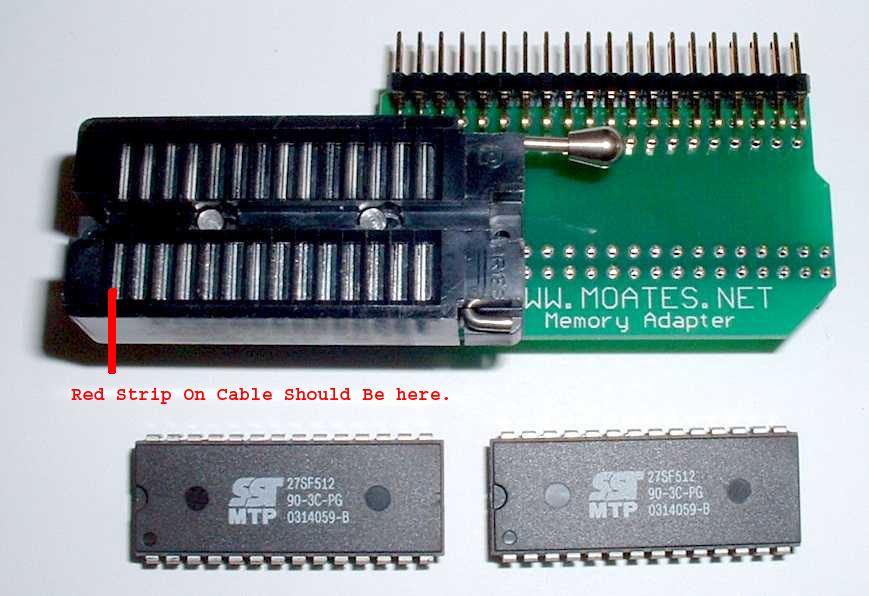
Also are you sure you have the ribbon cable in correctly? It looks like the red line should be by the Level if you have the zif socket on the G1 adapter. It should be on the other end like this.

GP10.jpg
 

epix

Typhoon
Re: Moates G1 Adapter broken?

the usb aldl cable is on COM3 which is what tunerpro is set to aswell.. when I put in the usb cable for Ostrich that is assigned as COM2

yes the red strip is on the left.. the truck does run crappy, it idles very rich (10.3ish) and goes lean quick with any throttle ~3000+ rpm (16-17 range)

I uploaded Digs 60lb bin and hit verify.. but I have no idea if it actually worked as the truck still runs like what I said above.
 

JSM

Active member
Re: Moates G1 Adapter broken?

could be bad ribbon cable also, i would say the trouble is in the ostrich or the upload
 

epix

Typhoon
Re: Moates G1 Adapter broken?

JS Manufacturing said:
could be bad ribbon cable also, i would say the trouble is in the ostrich or the upload
Could it be dead batteries in the Ostrich? (Although TunerPro does connect to Ostrich just fine) I can try this option when I get off work.
 

epix

Typhoon
Re: Moates G1 Adapter broken?

ordered a new cable ($20 shipping for 2 day ack...) hopefully it will arive before Friday so I can atleast get my truck running a bit better before homecoming!
 

UR50SLO

V6+2=LSXCamaro
Re: Moates G1 Adapter broken?

That is a strange problem you had there... Sure had me scratching my head. :screwy:

If you get that thing to actually connect let me know so we can get a half decent tune in it.

~Scott~

Like I said when you were over ..... I think it didn't even accept that upload you put in there... I bet it's running on the base Mem cal. or a base fuel map. That's what it sounded like to me.
 

epix

Typhoon
Re: Moates G1 Adapter broken?

tried a couple more things tonight..

put in new batteries, used a different laptop, and straightened out the ribbon cable and still no luck.

Put in the stock memcal and it connected right off the bat.. it must be the adapter or the cable.. we'll see when the new cable arrives and hopefully that will work.
 

skwayb

NWSTP
Re: Moates G1 Adapter broken?

Try uploading a bin to the ostrich without it connected to the ECM and then verify the bin. Make sure it says it verifies. Then connect the ostrich to the ECM. See how it runs. (Try another bin, maybe you got a corrupted one downloaded) Also make sure you are uploading it to a specific bank of the ostrich and not the entire 4 Mbit. If this works, then you will need to make sure you have the KEY on when you go to upload to the ostrich.

If it doesn't work then I would try it on another ECM to see if it works. But at this point I have a feeling you have a bad ostrich. Sounds like it if the ribbon cable doesn't work..
 

epix

Typhoon
Re: Moates G1 Adapter broken?

how do you set banks on the Ostrich? I see no switches on the Ostrich unit
 

JSM

Active member
Re: Moates G1 Adapter broken?

bank select is in toolbar in tunerpro, you might need to turn bank selection on though.
 

SBNova

New member
Re: Moates G1 Adapter broken?

I have a moates G3, but on some of my cars (like my Ty) I pulled the stock chip from the memcal and put a zif in its place. Try doing that, and eliminate the G1 and see if it works. The stock chip is only soldered in place about half the time. It can usually be removed with a small screwdriver gently prying it off. Have a soldering iron handy and just give each leg a little touch one at a time as needed if needed. I can have a chip off a memcal in about 3-5 minutes when soldered, and about a minute when not soldered.
 

epix

Typhoon
Re: Moates G1 Adapter broken?

i got a new ostrich cable which was the problem.. connected to ALDL no problem w/ the new cable
 

J-bird

Member
Re: Moates G1 Adapter broken?

I think Big Mike is right!

Try reinstalling the CDM_setup driver. If I am tuning and turn off my laptop I have to run that driver again before I can connect to the aldl stream. It was real frustrating at first but now that I know I have to do this its just one more step, and it works fine. May help, who knows?
 
Top